What is Gaussian Splatting? A Complete Guide to 3D Capture Technology
Gaussian splatting is revolutionizing how we create 3D digital captures of real-world objects and spaces. This comprehensive guide explains the technology, how it works, and why it's becoming the go-to method for photorealistic 3D documentation.
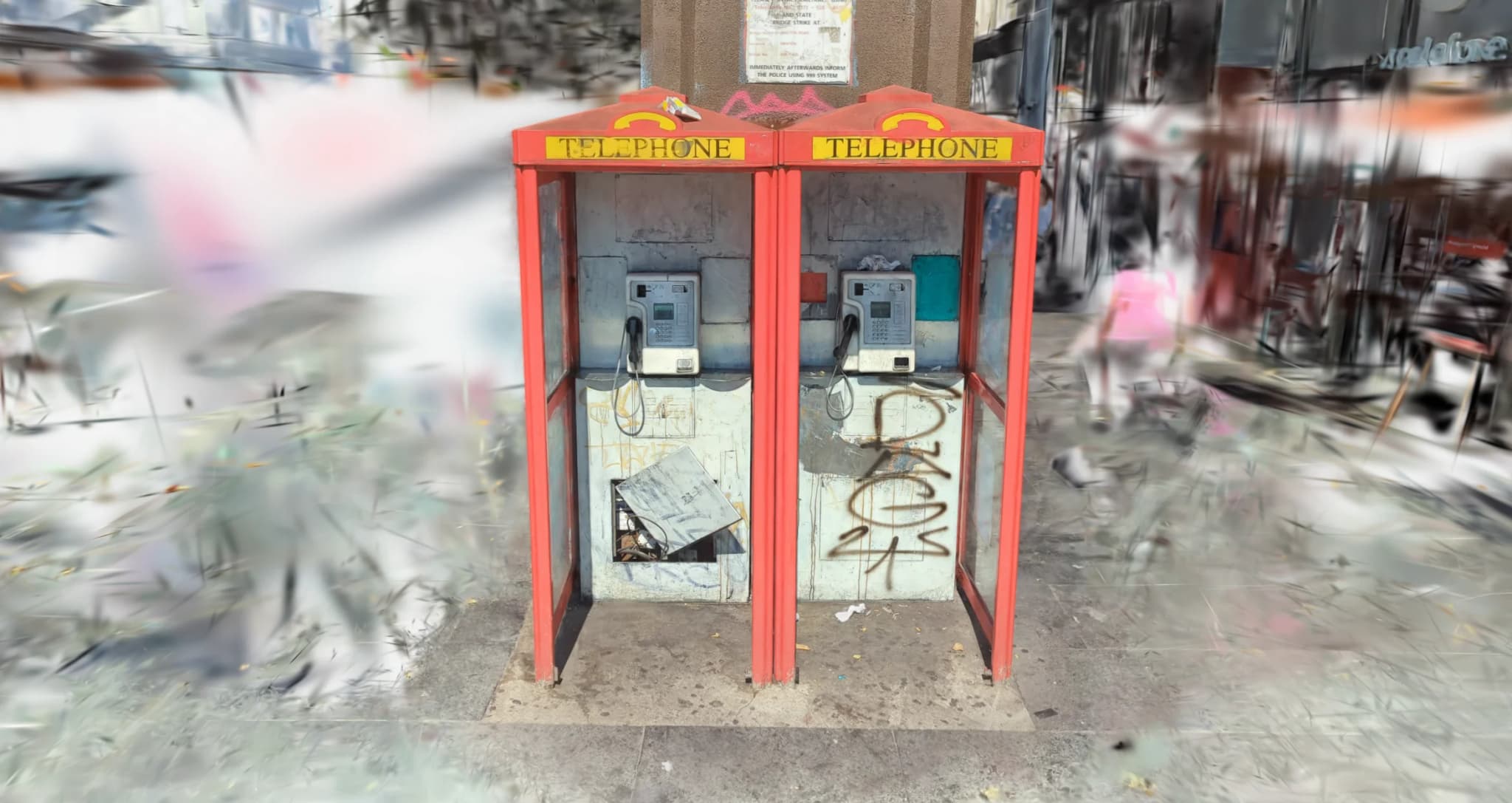
If you've seen incredibly realistic 3D models of products or spaces recently, there's a good chance they were created using Gaussian splatting. This relatively new technology is transforming how we capture and display 3D content, offering photorealistic quality that was previously difficult or expensive to achieve.
The Simple Explanation
Imagine taking dozens or hundreds of photographs of an object from every angle, then using AI to figure out where every point in 3D space should be and what color it should have. That's essentially what Gaussian splatting does - but instead of creating traditional 3D meshes with polygons, it represents the scene as millions of tiny, semi-transparent colored "splats" floating in space.
When you view the result from any angle, these splats combine to create a photorealistic image. It's like having millions of tiny, smart particles that know exactly how to arrange themselves to recreate what the camera saw.
Why It Matters
Before Gaussian splatting, creating photorealistic 3D models typically required either:
- Traditional photogrammetry - time-intensive processing that might take hours or days to generate high-quality meshes
- Manual 3D modeling - expensive and labor-intensive, requiring skilled 3D artists
- LiDAR scanning - high equipment costs and limited texture detail
- Neural Radiance Fields (NeRFs) - slow rendering times that weren't practical for real-time viewing
Gaussian splatting changes the game by offering photorealistic quality with relatively fast processing and smooth real-time viewing. This makes it practical for everything from heritage site documentation to e-commerce product visualization.
How It Actually Works
The process involves several key steps:
1. Photo Capture
First, you take photographs of your subject from many different angles. For small objects, you might take 50-100 photos. For buildings or spaces, you might need several hundred or even thousands. The key is good coverage - every part of the subject needs to be visible in multiple photos from different viewpoints.
2. Structure from Motion (SfM)
Software analyzes these photos to figure out where the camera was positioned for each shot. It identifies matching features across images and uses this to build a sparse point cloud - essentially a rough 3D skeleton of the scene showing where things are in space.
3. Gaussian Splat Training
This is where the magic happens. The algorithm places millions of 3D Gaussian "splats" throughout the scene. Each splat has:
- A position in 3D space
- A color (RGB values)
- An opacity (how see-through it is)
- A size and orientation (how it's stretched and rotated)
The system then optimizes these splats iteratively, adjusting their properties to minimize the difference between what the algorithm renders and what was in the original photographs. Think of it like teaching millions of particles to position and color themselves perfectly to recreate the scene.
4. Real-time Rendering
Once trained, viewing the result is remarkably fast. When you look at the scene from any angle, your graphics card simply renders all the visible splats from that viewpoint. Because this is fundamentally a rendering process rather than a simulation, it can run at 60+ frames per second even on modest hardware.
[Comparison Image: Traditional Mesh vs Gaussian Splat]
Side-by-side showing the difference in visual quality between traditional photogrammetry mesh and Gaussian splat of the same object
Gaussian Splatting vs Traditional Photogrammetry
Both techniques start with photographs, but they diverge significantly:
Traditional Photogrammetry
- Output: Creates polygon meshes with texture maps
- Processing time: Can take hours or days for complex scenes
- File size: Relatively compact (meshes + textures)
- Editability: Easy to edit and modify geometry
- Use cases: Best when you need traditional 3D models for CAD, manufacturing, or game engines
- Quality: Depends heavily on mesh resolution and texture resolution
Gaussian Splatting
- Output: Point cloud of Gaussian splats
- Processing time: Often faster, sometimes minutes rather than hours
- File size: Can be large (millions of splats), but compression improving
- Editability: More challenging to edit individual elements
- Use cases: Ideal for photorealistic visualization, virtual tours, and product displays
- Quality: Consistently photorealistic across the entire scene
The choice between them often comes down to your end goal. If you need to manufacture something or import it into traditional 3D software, photogrammetry makes sense. If your priority is stunning visual quality for viewing and exploration, Gaussian splatting often delivers better results with less effort.
Real-World Applications
Heritage Documentation
Historic buildings, archaeological sites, and cultural artifacts can be captured with millimeter accuracy and photorealistic detail. The fast rendering makes it practical to create virtual tours that run smoothly on regular computers and even mobile devices. I've used Gaussian splatting to document everything from Victorian windmills to historic churches, creating permanent digital archives that can be explored from anywhere.
E-commerce and Product Visualization
Products can be captured in full 3D with all their real-world materials and finishes intact. Customers can examine items from every angle, zoom in on details, and see exactly what they're buying. The photorealistic quality builds trust and reduces returns because customers know exactly what to expect.
Real Estate and Architecture
Properties can be captured as interactive 3D experiences that go beyond traditional 360° photos. Potential buyers or renters can explore spaces freely, getting a genuine sense of layout and scale. Architects can document existing buildings accurately for renovation planning.
Museums and Exhibitions
Artifacts and exhibitions can be preserved digitally with perfect fidelity to the original. Museums can create online collections that capture not just the shape but the exact appearance of objects - including subtle details like surface textures, patina, and weathering that make historical objects unique.
[Process Diagram: Photos → Point Cloud → Gaussian Splats → Interactive 3D]
Visual breakdown showing the transformation from input photographs to final interactive model
The Technical Requirements
For Capture
- Camera: Any decent camera works - even smartphone cameras can produce good results for smaller objects
- Coverage: You need overlap between photos - typically each point should be visible in at least 3-5 images
- Lighting: Consistent, even lighting works best - avoid harsh shadows or changing conditions
- Photo count: More is better - 50 minimum for simple objects, 200+ for complex scenes or spaces
For Processing
- GPU: A modern graphics card significantly speeds up processing
- RAM: 16GB minimum, 32GB+ recommended for large scenes
- Software: Various options available, from open-source tools to commercial solutions
- Time: Processing can take 30 minutes to several hours depending on scene complexity and hardware
For Viewing
- Web browser: Modern browsers with WebGL support
- Graphics card: Most recent GPUs handle Gaussian splats smoothly
- Connection: Good internet connection for initial load (files typically 20-200MB)
- Performance: 60fps+ on mid-range hardware once loaded
Limitations and Considerations
While Gaussian splatting is powerful, it's not perfect for every situation:
- Reflective surfaces: Mirrors, chrome, and highly reflective materials can be challenging
- Transparent objects: Glass and clear plastics are difficult to capture accurately
- Moving subjects: Everything needs to be stationary during capture
- File sizes: Can be large, though compression techniques are improving
- Editing complexity: Unlike traditional 3D models, you can't easily modify geometry
- Lighting baked in: The captured lighting is permanent - you can't relight the scene like a traditional 3D model
The Future of Gaussian Splatting
This technology is evolving rapidly. Recent developments include:
- Faster processing: New algorithms reducing training time significantly
- Better compression: Smaller file sizes without quality loss
- Dynamic scenes: Early experiments capturing movement and animation
- Integration with AI: Using machine learning to improve quality and fill gaps
- Accessibility: Tools becoming easier to use with less technical knowledge required
We're still in the early days of this technology. As processing becomes faster, file sizes smaller, and tools more accessible, Gaussian splatting will likely become a standard method for creating photorealistic 3D content across industries.
Getting Started
If you're interested in exploring Gaussian splatting for your own projects:
- Start with small, well-lit objects to understand the capture process
- Take more photos than you think you need - coverage is critical
- Maintain consistent lighting throughout your photo set
- Consider working with specialists for important projects - the technology is still evolving and experience matters
For heritage sites, products, or spaces that require museum-quality documentation, professional capture ensures you get the detail and quality your project demands. The investment in proper capture pays off in the final result - a photorealistic 3D asset that accurately represents your subject and provides an engaging viewing experience.
Conclusion
Gaussian splatting represents a significant leap forward in 3D capture technology. By creating photorealistic, smoothly-rendered 3D scenes from photographs, it opens up possibilities that were previously impractical or prohibitively expensive. Whether you're documenting heritage, showcasing products, or preserving spaces, this technology offers a powerful new tool for creating engaging, accurate 3D content.
The combination of photorealistic quality, real-time performance, and relative ease of capture makes Gaussian splatting particularly exciting. As the technology matures and tools become more accessible, we'll likely see it become standard practice across industries that value high-quality 3D visualization.